




You’ve adjusted your chair height, centered your monitor, and probably spent a few minutes getting the lumbar support just right. Then there’s the headrest, a feature many people either ignore or aren’t quite sure how to dial in.
That usually changes after a long afternoon at the desk.
After a long afternoon at the desk, you may notice your neck feeling tired, the headrest pushing your head forward, or the cushion sitting out of reach when you lean back.
The problem often isn’t the headrest itself. It’s how it’s been adjusted.
A common misconception is that your head should rest against the cushion throughout the workday. In reality, a headrest is there to provide support when your posture changes, not to hold your head in one position from nine to five.
Getting the setup right takes only a few minutes. Once it’s dialed in, the headrest should feel natural enough that you barely notice it’s there, until you need it.
Here’s how to position a chair headrest correctly and how to tell if it’s working as intended.
How to Adjust Your Chair Headrest

The key is making small changes and testing each one before moving on.
Step 1: Adjust the height
Start with the vertical adjustment.
Raise or lower the headrest until the centre of the cushion sits behind the middle of your head or the upper part of your neck.
If the cushion presses into the middle of your neck, it’s too low.
If it only contacts the top of your head or misses it altogether it’s too high.
Step 2: Adjust the depth
Next, adjust the depth by moving the headrest forward or backward, until there’s only a small gap between your head and the cushion.
You shouldn’t need to lean back several inches before making contact, but the cushion shouldn’t be pushing your head forward either.
The aim is to find a depth that supports the way you prefer to sit. Some people like the headrest slightly farther back during upright work, while others prefer light contact and support while sitting upright. It shouldn’t push your head forward or make you change your natural posture to reach the cushion.
Step 3: Fine-tune the angle
Next, fine-tune the angle of the cushion.
Try matching the angle to the natural curve of your neck.
If your chin starts pointing towards your chest, reduce the forward angle. If you lose contact completely every time you lean back, bring the cushion forward slightly.
There’s no need to force yourself into a position that feels unnatural. A good headrest adapts to your posture, not the other way around.
Step 4: Test it in real use
Finally, use the chair the way you normally would.
Read something, answer a few emails, sit upright and recline as you normally would. Pay attention to how the headrest feels across the positions you actually use throughout the day.
If you stop thinking about the headrest altogether, you’ve probably found a good position.
If you’re installing an Atlas Headrest for an Aeron, Atlas’s Aeron installation guide walks through the setup and adjustment process for the headrest.
Where Should a Chair Headrest Be Positioned?
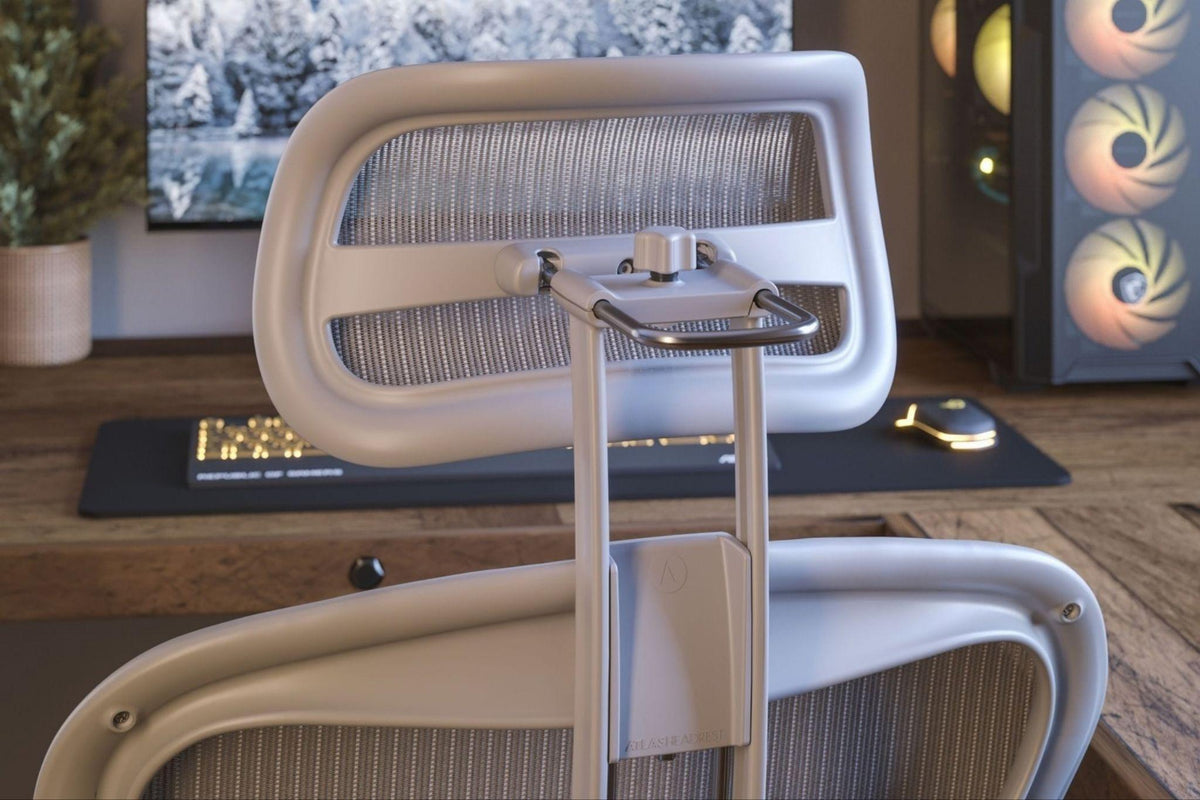
A properly adjusted headrest should comfortably support your preferred sitting position without forcing your head or neck into an unnatural position. Atlas Headrests are designed with adjustable height, depth and tilt so you can fine-tune the position to your body, chair and preferred sitting position.
When you’re working at your desk, the headrest shouldn’t force you to lean backward, push your head forward or tuck your chin toward your chest. Beyond that, the amount of contact you prefer is personal.
Some people prefer the headrest positioned slightly away from them during active upright work and use it more when they lean back. Others prefer light support while sitting upright because it helps them maintain a comfortable, supported posture. Both can be valid as long as the headrest isn’t forcing your head or neck into an unnatural position.
Sit as you normally would and test the headrest through the positions you actually use. If you find yourself changing your posture just to meet or avoid the cushion, adjust the height, depth or angle until the headrest works with the way you naturally sit.
Does Your Head Need to Stay Against the Headrest?
Not necessarily. How much contact you prefer can depend on your posture, task and personal comfort.
Some people prefer their head to remain free of the cushion during focused upright work and use the headrest more when they recline, read or pause between tasks. Others prefer the cushion positioned closer so it provides light support while they’re sitting upright.
The important part is that the headrest supports your preferred posture rather than forcing you into one. It shouldn’t push your head forward, force your chin toward your chest or make you strain backward to reach it.
Good ergonomic support should feel natural, and that can look a little different from person to person.
There’s No Single “Perfect” Headrest Position
Your posture changes throughout the day. You might lean forward while replying to emails, sit upright during a meeting, recline while reading or lean back while thinking through a problem.
Your preferred headrest position may change too.
Many adjustable headrests, such as the Atlas headrests, are designed to be easily repositioned.
Atlas’s headrest adjustment guide explains how to fine-tune the position and make small changes throughout the day.
Rather than looking for one setting that works for every situation, think of the headrest as something you can fine-tune as your workday changes.
There isn't one measurement or angle that's correct for every person. Body proportions, chair position, task and personal preference all affect where a headrest feels most supportive. Start with ergonomic fundamentals, then fine-tune from there.
Comfort can be surprisingly personal. We've even seen Atlas owners experiment with unconventional cushion positions because that's what feels best for their body.
Quick Tip: If your chair allows it, don’t be afraid to make small adjustments throughout the day. The best position for focused typing may not be the most comfortable position for reading or reclining.
Why Are Some Chair Headrests Tilted Forward?
At first glance, a forward-angled headrest can look as though it’s pushing your head into an awkward position. In most cases, that’s not the intention.
When you recline, your upper body rotates backwards. A slightly forward angle helps the headrest stay in contact with your head instead of leaving a large gap behind your neck.
The problem arises when that same adjustment doesn’t suit the way you normally work.
If your chin feels tucked down while you’re sitting upright, or you find yourself leaning away from the headrest, it’s worth adjusting the angle or depth if your chair allows it. You may also need to raise or lower the headrest slightly.
Small adjustments usually make a bigger difference than you’d expect.
How to Tell If Your Headrest Is Positioned Correctly?
After using your chair for an hour or two, ask yourself:
- Does the cushion comfortably meet the area of your head/upper neck you want supported?
- Can you maintain a comfortable head and neck position without the cushion pushing you forward?
- Can you move between your normal working and reclining positions comfortably?
- Does the headrest stay where you set it while still being easy to reposition?
- Most importantly, does the position feel supportive to you?
If the answer is yes to most of those questions, you’re probably very close to the right setup.
Quick Check: If you’re always adjusting your sitting position to suit the headrest, the headrest should be adjusted to suit you instead.
Common Headrest Adjustment Mistakes

Most problems come down to one of a handful of simple mistakes.
Forcing yourself into a prescribed position
A headrest should adapt to your body and preferred posture, not force you into a position because it’s supposed to be the “correct” one. Use ergonomic guidelines as a starting point, then adjust the height, depth and angle until the support feels natural to you.
Making large adjustments
It’s tempting to move the headrest several centimetres at a time, especially if it feels uncomfortable.
That usually makes it harder to find the right position.
Move one adjustment at a time. Sit for a few minutes, then decide whether another change is necessary.
Assuming there is only one correct position.
This is probably the most common mistake.
Your posture isn’t static.
You’ll naturally move between focused work, meetings, reading and short breaks throughout the day. If your headrest is adjustable, use that flexibility. A quick adjustment can make each position feel more supportive.
Ignoring the rest of your workstation
Even the best headrest can’t compensate for a chair that’s too low or a monitor that’s positioned poorly.
Comfort comes from the way your entire workstation works together. Chair height, lumbar support, armrests, monitor placement and your headrest all play a part.
Can an Aftermarket Headrest Improve Your Chair?
Many office chairs don’t include a headrest. Others come with one that’s fixed or offers very little adjustment.
An aftermarket headrest can be a worthwhile upgrade if it’s designed specifically for your chair and allows you to adjust the height, depth and angle to suit the way you work.
For example, Atlas provides a step-by-step Embody headrest installation guide for owners who want to see how the headrest attaches and how its movement is adjusted.
Compatibility matters just as much as adjustability. Atlas headrests are designed for specific chair families, so checking your chair’s compatibility before ordering is worth doing.
Frequently Asked Questions
Where should a chair headrest be positioned?
Start by positioning the cushion where it comfortably supports the back of your head or upper neck without pushing your head forward or forcing you to change your natural posture. From there, fine-tune the height, depth and angle based on your body and preferred sitting position.
Should your head be touching the headrest?
It can, but it doesn’t have to. Some people prefer light headrest contact while sitting upright, while others prefer more space and use the headrest primarily when they lean back. The right amount of contact is the amount that feels supportive without pushing your head forward or changing your natural posture.
Why are some headrests tilted so far forward?
A forward angle helps maintain contact with your head as the chair reclines. If it feels uncomfortable while you’re sitting upright, adjust the angle, depth or height until it supports your posture without pushing your head forward.
Can adjusting a headrest help reduce neck strain?
A properly adjusted headrest can provide additional support for your head and neck in the sitting positions where you choose to use it. For overall ergonomic comfort, headrest positioning should be considered alongside chair height, lumbar support, armrests, monitor position and regular movement throughout the day.
Final Thoughts
There’s no single headrest position that works for everyone. The right setup depends on your chair, your body, and how you use it throughout the day.
Use ergonomic principles as a starting point, then take advantage of your headrest’s adjustability to find the height, depth and angle that feel natural and supportive. For some people, that means more support while reclining. For others, it may mean light contact while sitting upright or different positions throughout the day.
A good headrest should adapt to you, not the other way around.
If your current headrest doesn’t give you that flexibility, it may be time to consider an adjustable option designed for your chair.